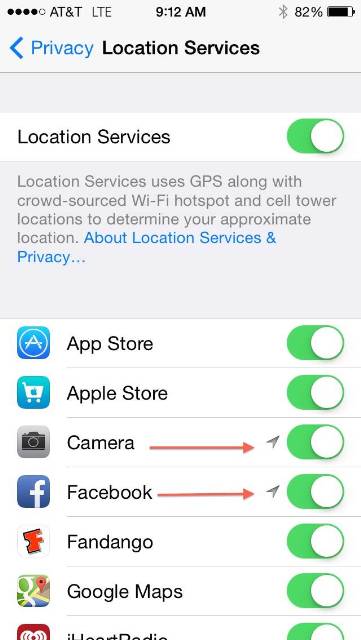

What does location services mean to you? What about Geotagging? As technology continues to develop, we have to become aware of what we are sharing and who is looking at that information.
Most of us don’t carry cameras with us anymore because the quickest way to snap a quick picture or video is with our smartphones. The newest phones come with capabilities to take high-quality pictures and video, so there is no need to have two devices in hand any more. But having new technology in your hands means you have to be aware of new features in order to protect your privacy.
Most new cell phones have a GPS built-in, which has the ability to store the location of where a photo is taken, down to the exact coordinates. All of this is stored in the EXIF data, an extra piece of information attached to every picture file your camera creates. So pictures that you snap with your phone can tell your exact location to anyone that you send it to. If you use an iPhone, that data is not readily available without using the iPhoto or third-party apps. With an Android, it’s more available to see the information right away.
I decided to do a test. I went to Michael's craft store in Rome and took a picture and sent it to a friend.


My friend who uses an Android phone immediately sent it back showing my location just one street over and less that one mile away. I never told my friend where I was, but he was immediately able to find the vicinity I was located in just by looking at the information attached to my photo.
So the important thing is to learn how to turn off those settings, especially if you are sharing pictures on social media, the Internet or with someone whom you may not be familiar. I suggest you turn off location settings for everyday use, and if you travel or go somewhere exciting, turn it back on so you can use that data for fun features later.
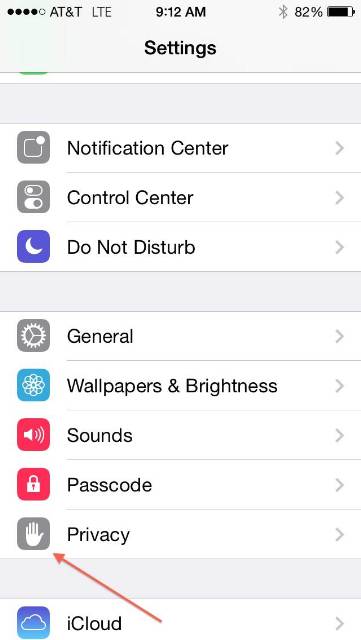
Here are the easy steps to turn off location settings on your iPhone:

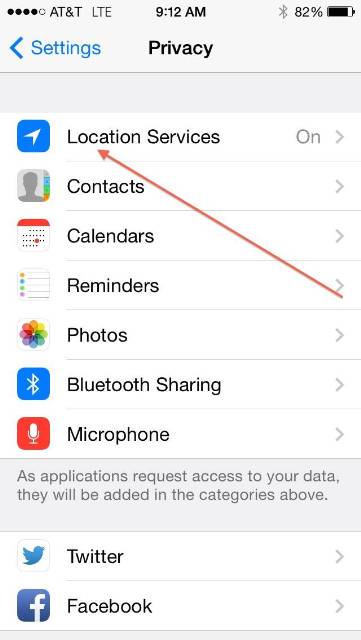
Click "Location Services."