
How Darlington Teaches AI

By Stefan Eady - Faculty

There's a good chance your child has already talked to an AI chatbot this week. This could have been to answer a question, generate a funny image or song, shortcut some work they didn’t want to do, or even ask for relationship advice. The biggest takeaway from this blog: talk to your child about their AI usage. But I’m going to focus just on the educational issues. A Pew Research Center survey released this year found that a majority of American teens now use AI chatbots, with more than half saying they've turned to one for help with schoolwork. Among that same group, three out of four say cheating with AI is at least a somewhat regular occurrence at their school. Yet they also say the tools have helped them learn. It's a familiar position for a school to be in: a new technology arrives faster than anyone can fully study it, and we're left teaching students to use it well, training teachers to use it wisely, and guarding against the ways it can go wrong, all at the same time.
It's not just a discipline question either. Researchers at the American Psychological Association point out that AI-generated answers carry an unearned air of authority. Children and teens (and, frankly, adults) are wired to trust something that sounds confident and instant, even when it's biased, incomplete, or plain wrong. A recent MIT faculty report on AI in education warns against what it calls "cognitive surrender," and argues the goal should be augmentation, not automation: AI that helps students think harder or more broadly, not AI that thinks for them. A recent Stanford review of the current research describes a similar pattern. In one study, high schoolers who used a general-purpose AI chatbot to study for an exam actually scored worse than students who had used traditional study methods. But tutoring-specific AI offers a different possibility. One UK study found that students using an AI that guided them step-by-step rather than handing over answers performed at least as well as students working with human tutors, and were notably better at applying what they'd learned to material they hadn't specifically practiced. There are traps in treating AI as a shortcut to thinking less, and real potential in treating it as a thought partner that deepens thinking instead. We're working through this tension with your student every day.
The approaches to teaching AI highlighted below came from looking at research, listening to the community, and some long-term faculty work. Last year, Derek Fine, our director of information technology, led a faculty Professional Learning Community to explore AI in education. Leah Lynn, our academic technology coordinator, built a group of teacher technology leaders using a Wood Fellowship Grant for Apple's Vanguard program to test ideas in real classrooms before sharing them schoolwide. Part of why we adopted Toddle, our learning management system, was its AI-forward design. Finally, we took part in ISM's AI Readiness webinar series to benchmark our approach against other independent schools. Here's what came out of all of that work, and what it looks like in your student's day-to-day this year.
AI Policy and Levels of AI Use in the Classroom
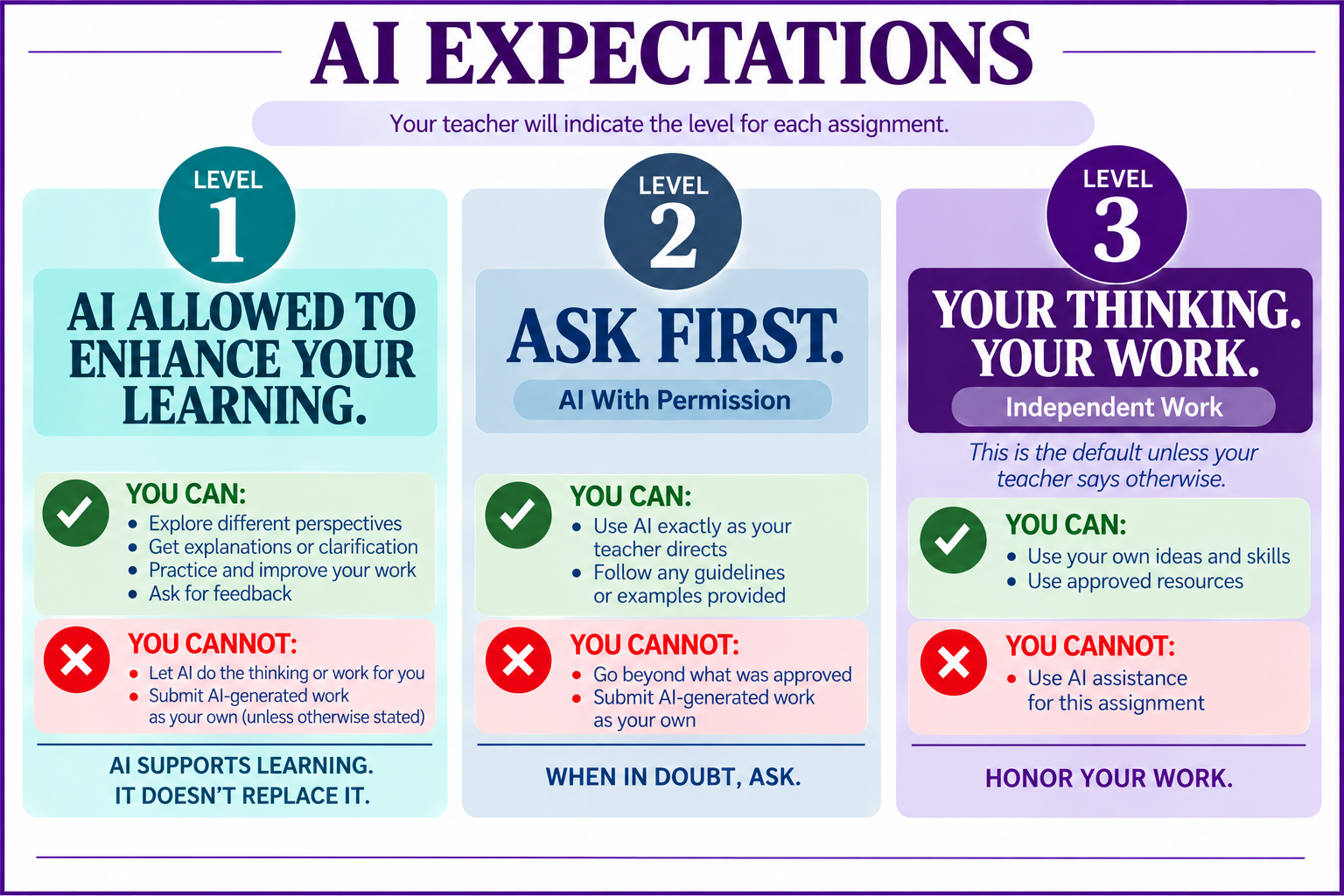
Rather than either banning AI outright or letting it run loose, we've sought to build clarity into how we expect students and faculty to use AI as part of the learning experience. Our new Artificial Intelligence Policy is now a part of each division's handbook and worth a review by everyone. To further make sure there is no confusion with students on how and when AI can be used in their coursework, our Vanguard technology teacher leaders created a three-tier system so that communication can be clear to students for every assignment:
- Level 1, AI Allowed (Enhance your learning): Students may use AI to explore different perspectives, receive clarification or additional practice, and provide feedback.
- Level 2, Ask First (Use with permission): Students may use AI following the guidelines and restrictions set by teachers.
- Level 3, Your Thinking. Your Work. (Independent work): AI assistance is not permitted. Students should use their own ideas and skills only.
It sounds simple, but it removes the guesswork that fuels both overreliance and confusion. Our goal is that students know the exact expectations, assignment by assignment.
Google Gemini for Students
When general AI chatbot use is permitted, we're also intentional about which tool students reach for. Our recommended platform is Google Gemini through students' Darlington accounts, rather than a personal account on a public consumer app. We know that we all have personal preferences for chatbots, but the choice here matters. Gemini gives us visibility into how AI is being used for schoolwork, adds safeguards around student use, and, importantly, keeps student conversations out of the pool of data used to train public AI models. Teachers may direct students to other tools when those are already part of a course resource, such as a textbook, a skills-practice website, or our LMS, Toddle.
Purpose-Built AI Tools in Toddle
General-purpose chatbots aren't the only AI your student will encounter this year. Our learning management system, Toddle, has AI built directly into it, and teachers can use it to create AI Tutors for a specific unit or guided video lessons that check for understanding as students work through them. This is exactly the kind of design the Stanford review points to as more promising: tools built with pedagogical guardrails, offering hints and step-by-step reasoning instead of a direct answer, showed more promise for durable learning than open-ended chatbots did. In one study cited in the report, a tutoring-style AI tool performed on par with a traditional textbook, while a general-purpose chatbot left students performing worse on their own. That's the difference between AI as a shortcut and AI as a scaffold that a teacher builds purposefully, and it's why we're leaning into these tools alongside Gemini.
Digital Citizenship and AI Literacy
Clarity around when to use AI, and which tools to reach for, is only part of the picture; knowing how to use it well is the rest. This year, every student will work through monthly digital citizenship lessons during Exploratory (grades 3–5) or Advisory (grades 6–12), covering responsible AI use, online safety, privacy, and ethical digital behavior alongside foundational keyboarding skills. We are using a new partner, Learning.com, for this curriculum. This is the piece researchers keep coming back to: teaching kids to ask who built a tool, what it might be missing, and when to trust their own thinking over a chatbot's answer isn't a one-time lesson. It has to be built over years, the same way we teach and continue to reinforce the many core and executive functioning skills that ultimately lead to our Portrait of a Graduate.
None of this means we have "solved" the challenge of preparing our students for an AI world. No one has, and AI will keep evolving and challenging all of us. But we can't wait for it to settle before we start adapting. What we hope you take from this post is that we're actively teaching your student to think critically about AI, use it with integrity, and understand both its power and its limits. We're always glad to talk with you about what you're seeing at home.
Talk with your student about AI
Whether sitting at the dinner table or catching up during a weekend phone call, here are a few low-pressure ways to talk about AI together:
- How have you used AI this week for school? For something personal?
- Has a chatbot ever given you a response that made you think, "Wait, that doesn't sound right"?
- Have you noticed AI showing up anywhere surprising lately?
- What's a productive way to use AI that I'm not aware of?