
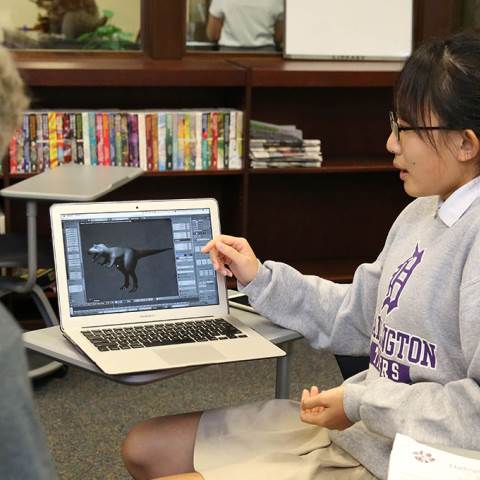


Technology is integrated into all aspects of learning at Darlington School. Darlington has a responsibility to develop students who are digitally capable, literate, discerning, and responsible. We believe that the best way to accomplish this goal is to create a technologically-infused environment in the classroom and throughout all learning environments.
All Darlington students have an individual iPad or MacBook Air. This not only connects our students to online academic resources, but prepares them for a technologically connected world while allowing them to research and work independently.

While all students are given a higher level of technology literacy, more specialized technology classes are also an essential part of our curriculum. Our middle grades students have the opportunity to take Introduction to Engineering and Design as well as Robotics Courses while our Upper School students can elect to take courses in the areas of robotics, computer science, engineering, and media arts.
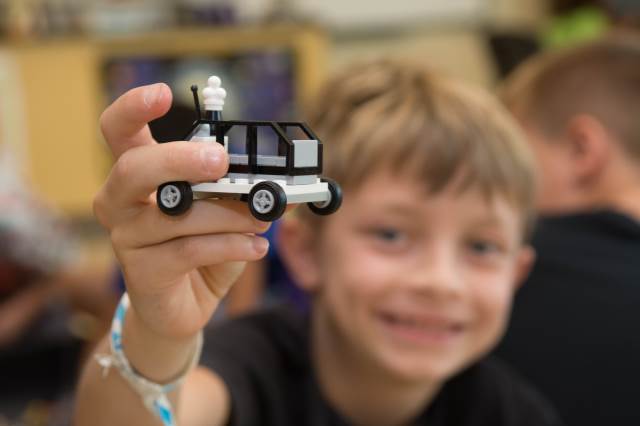
Technology integration at Darlington has also expanded to classroom STEM activities (Science, Technology, Engineering, and Math), and student makerspaces and dedicated faculty are available for students in both Pre-K to 8 and Upper School divisions.
Darlington sets policies to help guide the responsible use of technology by students, faculty, and visitors to campus. At all times, the main purpose of technology use at Darlington should be for educational purposes. Students using technology during academic times, such as during the school day or evening study hall, should only do so for educational purposes or at the direction of the teacher.Darlington sets policies to help guide the responsible use of technology by students, faculty, and visitors to campus. At all times, the main purpose of technology use at Darlington should be for educational purposes. Students using technology during academic times, such as during the school day or evening study hall, should only do so for educational purposes or at the direction of the teacher.
The Rules of the Road for MacBook and iPad as well as the Technology Acceptable Use Policy apply to all students in grades Pre-K to 12. Faculty policies and procedures are also provided.
Darlington uses internet filtering software to both block access to inappropriate sites and to log all Internet activity. This filtering happens for all devices using the Darlington School campus network. It also applies to all school-issued devices both on and off campus, including tablets and laptops issued to students. The faculty policy applies to all adults on campus.
Requests for recategorization of blocked websites should be made to the I.T. Office and each request will be reviewed individually. Student requests may require the approval of a teacher if the site is class-related. Residential student access to the internet is turned off entirely on school nights from midnight until 6 a.m. the following morning.
Note that some internet services (such as games or video) may be blocked due to excess bandwidth consumption or incompatibility with the school's firewall. The internet is too vast and quickly changing for any web filter to keep up, but we do log all Internet use and expect all users to abide by the spirit of this policy.
The I.T. Office, in partnership with the Student Life and Counseling Office, analyzes this log information weekly. This is done by looking for general patterns of potential misuse as well as individual spot checks. In the case of spot checks, the parent and students will be notified of the result. In the case of any discovered issues, action taken may range from parent notification or conference, students being temporarily placed in a more restrictive filter group, or collection of the device.
| Categories | Students PK-5 | Students 6-8 | Students 9-12 |
|---|---|---|---|
|
Adult Materials, Nudity, and Pornography
This includes websites with explicit or sexual content.
|
Blocked | Blocked | Blocked |
|
Social Media
Media hosting communities with forums or communities that allow generated content.
|
Blocked During School Day | Blocked During School Day | Blocked During School Day |
|
Social Networking
Sites used to create personal and professional relationships.
|
Blocked During School Day | Blocked During School Day | Blocked During School Day |
|
Chat and Messaging
Websites that have their own instant messaging services.
|
Blocked | Blocked During School Day | Allowed |
|
Network Misuse
Websites that allow anonymity, hacking, or evasion.
|
Blocked | Blocked | Blocked |
|
Streaming Media
Sites that host video or audio content that can be watched or heard live.
|
Blocked During School Day | Blocked During School Day | Allowed |
|
Gaming
Websites that feature single or multiplayer online games.
|
Blocked During School Day | Blocked During School Day | Allowed |
|
Ecommerce / Shopping
E-commerce or shopping websites which may expose students to adult products.
|
Blocked During School Day | Blocked During School Day | Allowed |
|
YouTube
Restricts potential mature content.
|
Restricted Mode | Restricted Mode | Moderate Restrictions |